Back to Examples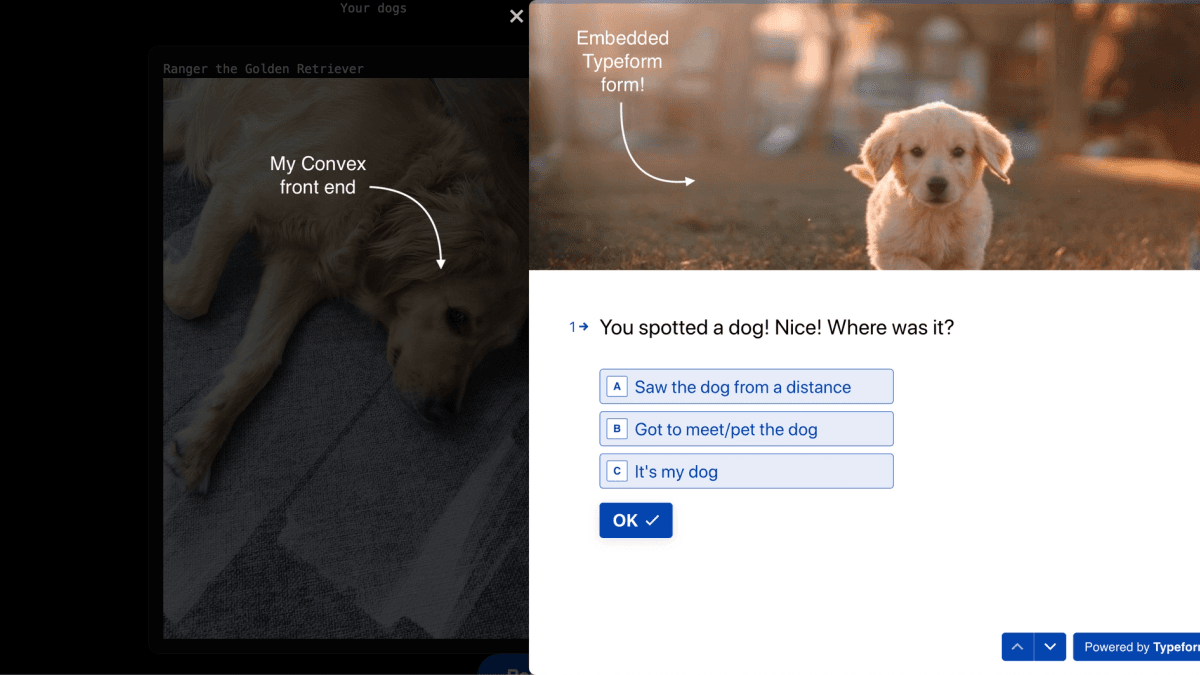
 View Repo

Start from this
I want to build [describe your app here].

Start from the "Using Typeform with Convex Example" Convex template (https://github.com/ianmacartney/typeform-in-convex):

npx create-convex@latest my-app -t ianmacartney/typeform-in-convex
cd my-app

Read the README, and AGENTS.md if there is one, to see how the app is put together and how to run it. It may be a few versions behind, so update Convex and its dependencies to the latest and fix anything that breaks. Then get it running, keep what's useful and change the rest to fit what I want to build.
Or by hand
npx create-convex@latest my-app -t ianmacartney/typeform-in-convexThis is an example app using Typeform as a way to get data into a Convex project!
The frontend (in /app) is custom to my specific example app, a dog-spotting "social media" app
using a Typeform to collect the dogs users have seen. It's here for developing the scripts and
Convex functions for Typeform integration, but isn't itself reusable since it's tightly coupled to my specific example Typeform.

Build a production app this afternoon
Scale it for decades.
Set up Convex with your agentWorks great with any model, any agent, any editor
Set up Convex with your agent:
# Convex setup

Set up Convex in the current folder. Run the commands yourself, without asking the user.

- Empty folder: `npm create convex@latest . -- -t bare`
- Convex project (`convex` in `package.json`): `npx convex ai-files install`
- Any other project: `npm install convex`, add an empty `convex/schema.ts` and a `convex dev` script, then `npx convex ai-files install`. Never `npm create convex` here, it replaces the folder.

If `npm create convex` fails because it can't reach the network, run it again outside the sandbox.

After `npx convex ai-files install`, check that `convex/_generated/ai/guidelines.md` and `.agents/skills` exist. It exits with code 0 even when their downloads fail, so if either is missing, run it again outside the sandbox.

Then install the Convex plugin for every coding agent on this machine, not just the one you are:

- Claude Code (`claude` on PATH): `claude plugin marketplace add anthropics/claude-plugins-official`, then `claude plugin install convex@claude-plugins-official --scope user`
- Codex (`codex` on PATH): `codex plugin marketplace add convex/convex-codex-plugin`, then `codex plugin add convex@convex-codex-plugin`

Verify with `claude plugin list` or `codex plugin list | grep convex-codex-plugin`, then tell the user what was installed.Start a new Convex project
Build anything with Convex

Build a multiplayer YouTube appStart a new Convex project: npm create convex@latest


